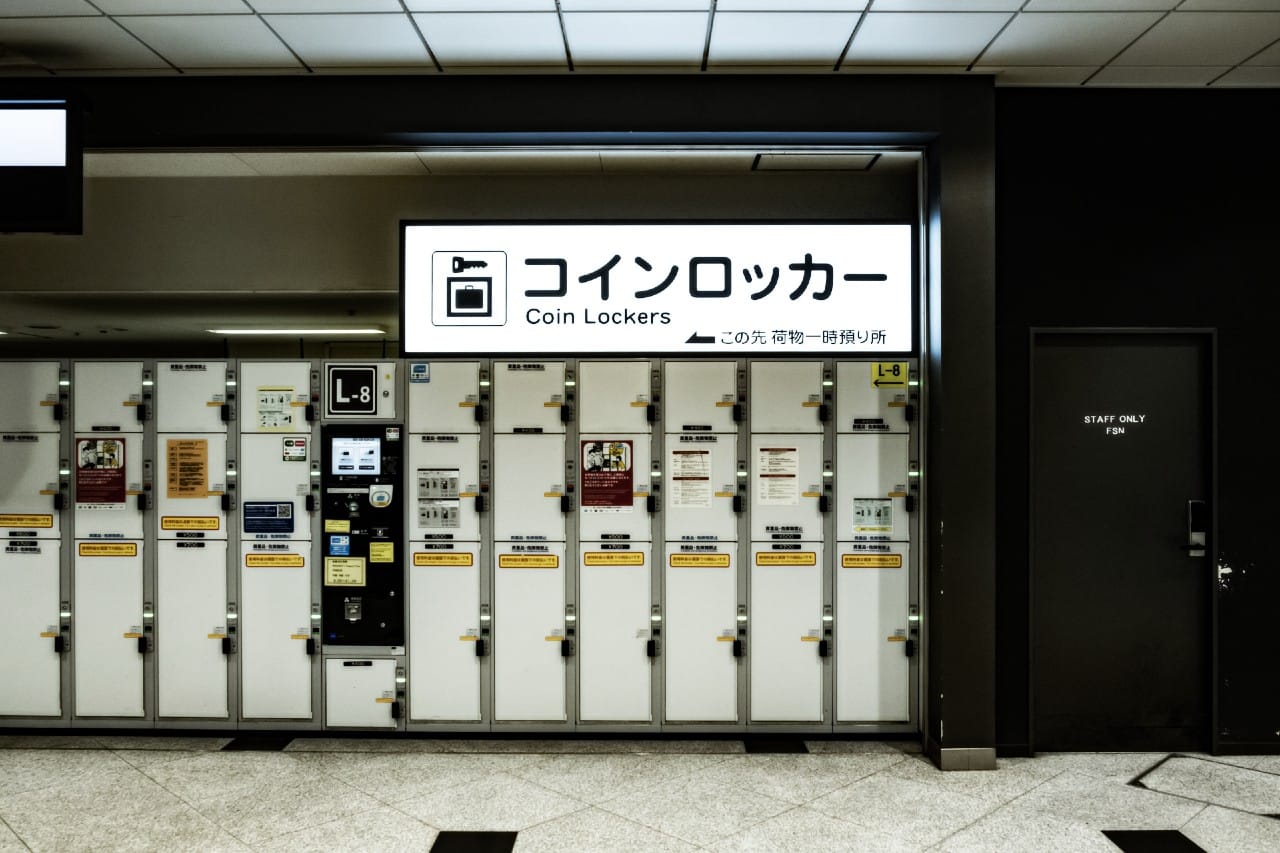
Coin Locker Navi Guide: How to Find Coin Lockers in Japan

CDJapan Rental has a great deal on pocket wifi, with a range of flexible plans starting at ¥187/day.
Japan Pocket Wifi Rental
Japan eSIM : Fast & Easy & UNLIMTED
Japan Travel eSIM

Japan Travel Tips

How to Find Coin Lockers in Japan

A complete guide to locating luggage storage at train stations — including Coin Locker Navi and Tokyo Metro’s locker tools


I still remember arriving at Namba Station in Osaka early one morning after an overnight bus from Tokyo. My friend and I had large suitcases, and we spent nearly half an hour walking the station looking for an available large coin locker — tired, a little lost, and running out of time before our first plans of the day. We eventually found one, but it was not a fun start to the trip.

That experience made me realise how useful it would be to know in advance where coin lockers are — and whether any are available. This guide covers exactly that: how to find coin lockers at Japanese train stations using the best online tools available, so you can plan ahead and start your day without the stress.

The Best Tool: Coin Locker Navi

The most comprehensive resource for finding coin lockers in Japan is Coin Locker Navi. It is a free, dedicated website that maps coin locker locations at train stations across the country — from major hubs like Tokyo, Osaka, and Kyoto to smaller regional stations. Whether you’re heading to Ikebukuro, Shinjuku, Fukuoka, or anywhere in between, this is the go-to tool for locating where lockers are.

Coin Locker Navi

A free map-based tool covering coin locker locations at train stations across Japan. Search by station name or browse by city to find lockers near your destination.

Visit coin locker navi.com

Language note: Coin Locker Navi is currently only available in Japanese. However, it works well with your browser’s built-in translation — in Chrome, right-click anywhere on the page and select “Translate to English”. The station maps and icons are intuitive even without translation.

What You Can Do with Coin Locker Navi

  • 🗺

    Find coin locker locations at hundreds of stations across Japan — including Tokyo, Osaka, Kyoto, Nagoya, Sapporo, Fukuoka, and many more. This nationwide coverage is the tool’s main strength.
  • 📏

    Filter by locker size (small through extra-large) so you can confirm there’s a locker that fits your luggage before heading to the station.
  • 📍

    See the exact position of each locker bank within the station — which exit, which floor, which corridor. This is especially useful at large and complex stations like Shinjuku or Osaka.
  • 💴

    Check pricing and payment methods for each locker location, including whether IC cards such as Suica or Pasmo are accepted.
  • 🕐

    Check operating hours — not all coin lockers are open 24 hours, and this can vary even within the same station.
  • 🔴

    Real-time availability at select stations only (see below). For the vast majority of stations, you’ll need to check availability in person when you arrive.

Understanding Locker Sizes and Prices

Coin Locker Navi colour-codes its locker size labels to match the physical lockers. Prices listed below are standard reference points — actual prices can vary by station and operator, so always confirm the figure displayed on the locker itself.

Small
Backpacks, handbags
from ¥300

Medium
Carry-on size bags
from ¥400

Large
Most large suitcases
from ¥500

特大
Extra-Large
Oversized luggage
from ¥600

Extra-large lockers are not available at every station. Prices at busy tourist stations may be higher — for example, large ¥700 or extra-large ¥1,300. Always confirm the posted price before use.

Real-Time Availability: Three Stations

Coin Locker Navi previously offered real-time online availability checks for many stations including Shinjuku and Ikebukuro. This feature has since been discontinued for most locations.

Currently, live locker availability can only be checked online at these two stations:

For all other stations, Coin Locker Navi will show you where the lockers are located in detail — but whether any are free will need to be confirmed in person when you arrive.

How to Read the Availability Icons

At the three stations where real-time data is active, map icons are colour-coded by availability:

Green
Plenty of lockers available

Orange
Only a few lockers left — head there soon

Red
No lockers available — try a nearby location

How to Use Coin Locker Navi Step by Step

  1. 1
    Open the website at coinlocker-navi.com. Since the site is in Japanese, enable auto-translate in your browser — in Chrome, right-click anywhere on the page and select “Translate to English”.
  2. 2
    Search for your station. Use the search bar or browse by prefecture and city. Typing the station name in romaji (e.g. “Ikebukuro”, “Kyoto”, “Hiroshima”) usually works well.
  3. 3
    View the station map. Locker locations are plotted on a detailed station layout so you can see which exit or corridor each locker bank is near.
  4. 4
    Click any locker icon to see the size breakdown, pricing, operating hours, and accepted payment methods for that specific location.
  5. 5
    Head to the station. For most stations you’ll confirm availability in person. Arriving early is the best strategy at busy tourist destinations.
Pro tip: Screenshot the locker map before you travel. It works offline and saves you hunting for Wi-Fi when you arrive at the station.

For Tokyo Metro Stations: Two Dedicated Tools

If you’re traveling within Tokyo on the Tokyo Metro network, there are two additional tools specifically covering Tokyo Metro stations — one for finding locker locations, and one for checking availability in real time.

Note: Tokyo Metro and Toei Subway are separate companies, though many of their stations interconnect. These tools cover Tokyo Metro lines only.

メトロコマース

Metro Commerce — Tokyo Metro Locker Finder

metocan.co.jp/locker  |  Japanese only

Run by Metro Commerce (メトロコマース), Tokyo Metro’s retail subsidiary, this is the official coin locker finder for Tokyo Metro stations. It covers all Tokyo Metro stations and shows the exact location of each locker bank within the station. Like Coin Locker Navi, this is a location reference tool rather than a live availability checker — it tells you where to look, not whether a locker is currently free. The site is in Japanese, but browser translation makes it easy to navigate.

ロッカーコンシェルジュ

Locker Concierge — Real-Time Availability at Major Stations

metro.akilocker.biz  |  5 languages including English

For major Tokyo Metro stations with higher footfall, Tokyo Metro provides a real-time locker availability tool called Locker Concierge (ロッカーコンシェルジュ). This is one of the most accessible options for international visitors, as it is available in five languages: Japanese, English, Simplified Chinese, Traditional Chinese, and Korean.

Select your station from the list and you’ll see a 3D floor map showing the current availability of each locker area, colour-coded as follows:

Green
Lockers available

Yellow
Available but limited — secure one soon

Red
Full — no lockers currently available

Real-time data is only available for larger, busier Tokyo Metro stations. Smaller stations on the network may not appear in this tool.

Paying with Suica or IC Cards

Many coin lockers at major stations now accept Suica, Pasmo, Icoca, and other IC cards in addition to cash. This is very convenient if you’re already using a transit card for train travel. Coin Locker Navi indicates which locker locations support IC card payment. If in doubt, bring ¥100 coins as backup — most machines accept them.

Practical Tips for Using Coin Lockers in Japan

  • 🕒

    Not all lockers are open 24 hours. Some close at 11pm or earlier, particularly at smaller stations. Check operating hours on Coin Locker Navi before making plans around a specific locker.
  • ¥

    Prices are typically per day or per time block. Extra charges may apply if you collect your luggage outside the paid window. Always check the price displayed on the locker itself — rates vary by operator and location.
  • 📅

    Maximum storage is usually 3 days. Luggage left beyond this will be removed and held by station management. You’ll need to visit the station office to retrieve it, and additional fees may apply.
  • 🕔

    Large lockers fill up fast at popular tourist stations. At busy spots like Kyoto Station or Asakusa on a weekend morning, try to secure a locker early. If all large lockers are taken, check a different area of the same station or a nearby station.
  • 📋

    Read the instructions on the locker. Mechanisms vary — some use a physical key, others a PIN code, and newer ones use QR codes or IC cards. The process is usually shown with diagrams, even in Japanese.

(Visited 10,959 times, 1 visits today)
🇯🇵
Recommended Japan Data Plans
Short trip or long stay — we've got you covered

Best for Travelers

Japan eSIM
From ¥2,800 — activate before you land

  • Cheaper than airport & convenience store SIMs
  • 5-day to 135-day plans; unlimited or data-capped
  • No SIM swap needed — ready in 2 minutes
No SIM swap Flexible days
View Plans →

Best for Long Stays

Monthly Pocket WiFi
From ¥5,500/mo — unlimited, no throttle

  • Choose WiMAX 5G or SoftBank 4G coverage
  • 3 to 12-month contracts — longer means cheaper
  • Delivered to your hotel or airport post office
5G available Unlimited
View Plans →
GetAround Japan is your number one travel guide, providing the latest information on visiting and living in Japan, with tips on what to eat, things to do, and places to stay. Whether you're planning for a trip far in the future, or already in Japan in need of some fresh ideas, our archive of posts will help you find the best way to fill your time and get the most out of your travel experience. We provide you updates on serious policies that affect visitors and foreign residents while also keeping things light and fun with articles on quirky trends and pop culture. How do we know how to provide visitors the information they need? Our affiliate company CDJapan Rental provides WIFI and Sim Card rentals to thousands of visitors to Japan every year. In other words, we are constantly in touch with and listening to the voices of our customers, and infuse our blog with the information they ask us for. For inquiries, contact us here: contact us . =Company Information= CDJapan Rental (Neowing Corporation) 1-10-15-3F Nihonbashi Horidome Chuo, Tokyo 103-0012, Japan
Scroll to top